Hello Whoops: Delete Your First Blog Post

If you’re starting a new blog, delete your first post. Think of it as a test. When launching this blog, I plunged into my inaugural entry and triumphantly published. Some time later, to my horror, I noticed the URL for that post: https://faithfulweb.wordpress.com/2006/10/02/hello-world/. Yes, that’s the WordPress default name, based on the classic phrase programmers use when learning to display text in a new language. Kind of like see-spot-run, but less sophisticated.

Facing a post whose URL screamed “newbie,” I contemplated deleting it and starting again. At the same time, the house blessings post turned into one of the most popular entries on my site to this day. Deleting or renaming could lose me links or search engine results so I left it as is. When sharing the link, though, I use anchor text whenever possible.

I haven’t made that mistake since, although it would be hard to since WordPress doesn’t set a default file name other than with the first post. But I don’t want any of you who are starting a new blog to make the same mistake so I’m sharing it here. You’ll also find this lesson on Daniel’s “blogging mistakes” group writing project on Daily Blog Tips. If you are looking for more blogging tips, Daniel’s site is a good reference. I previously participated in his site traffic tips project.

Has anyone else pulled a hello-world when starting a new blog?

10 Steps to a Church Lent Page that Shows Up in Google

UPDATED for 2017 Ash Wednesday kicks off Lent and is often the busiest day of the year for church websites. Are you going to get your ash in gear and build a dedicated Lent page that works? Here are 10 steps showing how to get your site ready for Lent to make the most of that traffic spike from Ash Wednesday.

  1. Create a permanent page for your Ash Wednesday and Lenten schedule of events and prayers. You want a spiderable page that is going to show up well in searches over time. If your only mention of Lent is a fleeting one on your home page or is relegated to a calendar page that’s soon going to look like last year’s news, then you’re missing the opportunity to reach potential visitors. You should still link from the homepage and your calendars, but use a fixed page and give it time to get noticed.
  2. Give your page a short, memorable name. Think http://www.example.com/lent/ or example.com/lent.html. Use a virtual directory or a forward to preserve you information architecture if necessary, but don’t expect someone to remember example.com/content/calendar/holydays/year/lent2007.yaddayadda.
  3. Include your daily and weekend Mass schedules on your Lent page. Again, you want to make the offer to those newcomers, and established parishioners, looking to do something extra for Lent.
  4. Before the start of Lent, have your entire schedule of events posted, including Holy Week. This may be your only chance to reach newcomers; make sure everything you have to offer is there. Doing so also increases the chances it appears in the snippet of a search engine result.
  5. Include your street address and neighborhood nicknames on the page. You want someone looking for “ash wednesday [town name or neighborhood]” to find you.
  6. Include links to driving directions, parking and any other content you have for newcomers. Even if this content is in your regular navigation, call it out here.
  7. Leading up to Lent, push the Ash Wednesday dates to the top of both your Lent page and home page.
  8. As you get closer to Easter, move your Holy Week schedule to the top.
  9. Tie your other events to Lent, even if they are not explicitly Lenten events. Anything prayer related has a natural tie-in to Lent. Same with other educational opportunities and prayers/reflections.
  10. Include a printout of your page(s) or equivalent content in your bulletin. Make sure your URL is prominently displayed along with your street address and phone number. If someone wants to post the info on their fridge or share it with a friend, the recipient might not already “know” that the info came from your church. Leave no doubt and spell it out.

[Here’s the ancient St. Charles Lent page from my previous parish back in the day. Seen any good Lent pages out there? Share them in the comments.

RSSLike this post? Subscribe to the feed.
Related: 40 Content Ideas for Lent

30 Traffic Ideas for Your Church Site

Daniel’s terrific Daily Blog Tips invited bloggers to submit their best traffic-generating tips, with the ideas and link love to be shared among everyone involved. Here they are so give these a try. And you might try a similar call-for-submissions post to generate some links for your own church site.

(My comments on how to apply the tips to church websites are in parentheses.) Continue reading

Take a Page from St. Mary’s of Greenville, SC

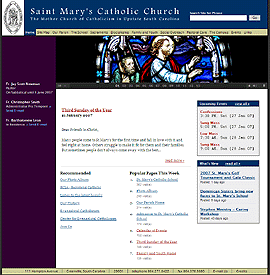
St. Mary’s home page
Update: November 15: St. Mary’s site is restored 

See this post for related coverage.

Update: November 14, 2008, 10:37 PM ET.
The St. Mary’s of Greenville site is unavailable as I write this so many of you are coming here looking for more information. Try these links:

I’m guessing St. Mary’s site is unavailable due to a surge in traffic, but I have not yet heard back from one of my webmaster contacts there.
Thank you–Mark
[Update from Nov. 15, 2008: Port 80 was closed intentionally to give time for the Diocese to regroup.] 

OK, back to the original review from January of 2007…

You don’t have to wonder this month why , South Carolina is American Catholic’s website of the month. One look at this site’s beautiful layout and gorgeous pictures will inspire you to explore the clearly displayed main content areas and to read the fresh news. Let’s take a closer look at the many elements of church site design St. Mary’s does right that you may want to try on your own site.

Continue reading