7 Rules for Working With Church Creative Types

There's no "art" in WordArtDo you have any designers volunteering at your church? I unwittingly set one up for failure by not spelling out the only two approaches that can lead to success. Make sure whoever is working with your creative talent reads Seth Godin’sA Clean Sheet of Paper” post before the next assignment comes up (and follow these rules below). He totally nails the unfair situation that volunteer artists often find themselves in of trying to guess what the church leaders want without any real guidance.

If you don’t spell out a strategic vision for the assignment and offer some guidelines then Seth correctly states that “you have an obligation to use what you get, because your choice was hiring this person, not in judging the work you got when you didn’t have the insight to give them clear direction in the first place.”

The Set Up
I brought in a new volunteer who was a professional graphic designer for what seemed like the perfect first assignment: coming up with a logo for a series of new events that would take place over 10 months. No legacy issues, the design didn’t have to last forever and it was a quick turnaround. Just go to this meeting, find out what they want and crank out a great logo.

A few weeks later I received an email with the new logo. But it wasn’t a PSD, EPS or even a JPG. It was a Word document with an image consisting of WordArt text and a Microsoft drawing object.

Maybe it was just a draft I thought. No, the committee decided they didn’t like the professional’s first draft so they literally took matters into their own hands without getting back to her.

At this point I had one understandably upset designer and a low resolution graphic that wasn’t going to show up well on a website or on a sweatshirt. Fortunately, another friend who’s an artist reverse engineered the WordArt into something scalable. It wasn’t easy, but we did it and learned some lessons along the way.

Here are some guidelines to follow so this doesn’t happen to you.

Rules for Working with Church Creative Types

  1. Explain in writing the purpose of the design, how it fits into your church’s strategy, the goals for the project and what you hope to communicate.
  2. Figure out ahead of time what you want. Find examples from other churches or even other industries that catch your eye. Identify some that you hate. Provide these up front.
  3. Agree on the review and submission process up front. Are you getting three comps and two rounds of edits? Who has a say? This should be as small a group as possible. Their evaluation should be in light of the first two points.
  4. Be honest. Does the pastor have veto power? Don’t waste the designer’s time with the committee if the decision-making power doesn’t truly reside there.
  5. Agree on a timetable up front for deliverables and decisions.
  6. Keep the right perspective. Your logo is ultimately serving a higher purpose. It’s not an end in itself.
  7. Determine ahead of time who “owns” the final product, whether a creative commons license or copyright is appropriate, and how you’ll attribute credit.

You’ve probably run into these challenges. So what works at your church? Share your tips in the comments.

Announcing Weather-Related Church Closings to a Mobile Congregation

By abac077 via Flickr

When my boys’ school called to announce an early close because of snow, two thoughts came to mind:

  1. Why are you closing over a couple of inches snow? (The former New Englander in me)
  2. If my church closes, we can put our Twitter account to good use.

My parish soon canceled that evening’s events. Here’s how we got the word out quickly online to parishioners.

I called the parish office to find out a status update. (Ideally someone on staff should be on point to initiate such messages.) We then sent the word out through these channels:

  • Home page
  • Church Twitter account, @StCharlesChurch (See tweet)
  • The parish’s breaking news email list, one of the 3 email newsletters every church should publish. (See message)
    • We used a descriptive subject line, Office Closed, Activities Canceled for Wed., 1/28. Recipients didn’t even have to read the body to get the gist, particularly since everyone already knew it was snowing.
  • Parish online calendar (See entry)

One channel we missed was the outgoing message on the parish office’s voicemail. Alas, the phones fall outside of my Web Ministry, but I’ve made the recommendation.

Update – December 2009: If Mass or a church service could be impacted, link to your diocesan policy and provide info to a local televised Mass if available.

So that’s how St. Charles does it. What works at your church for sending out short messages quickly?

Email Marketing Guide for Churches From Exact Target

Looking for ways to improve your church’s email marketing in the coming year? Here are the top marketing ideas and how they apply to churches from ExactTarget’s 2009 Marketing Almanac
 

Marketing Almanac 2009 from ExactTarget includes insight for churches

 
1. It’s going to get harder to get parishioners to notice and open your emails as more organizations turn to email even more.
Email is becoming more attractive as a relatively cheaper channel compared to other options. Your competitors—other churches, entertainment venues and ecommerce—are going to crank up their email output and you might pay the price.

  • Keep focused and helpful.
  • Don’t pollute your lists with message creep. (Hey, we need more fundraising—how about sending the contributions appeal to the volunteer openings list? Um, no.)

2. Today’s savvy audiences expect you to offer choices for keeping them informed.
Users want to get updates on their own terms, not yours. They might choose email, RSS, Twitter, text messages, mobile and who knows what’s next. Pick flexible, free options such as Google Groups so your congregation can self select.
 

3. Cloud computing is here to stay so take advantage of it.
Now’s the time to use distributed services such as Google Groups and Google Analytics.


4. Customization and personalization become must-haves.
Start looking at good sources for more information about your audiences. Try your front desk staff to see the kinds of questions that come in and the needs that you should be meeting. Or run a free survey on your church site such as 4Q from iPerceptions


5. Prepare to face more pressure in the workforce.
Rampant layoffs have many on edge. Those still working are expected to do more with less. You may find it harder to hold onto volunteers in such an environment. But, you might also have opportunities to reach more people who turn to God in times of trouble. Make sure you’re ready to support your current volunteers and to welcome those who are in need.


That’s my take on how your church can make the most of ExactTarget’s predictions. What are you going to focus on next?


Church Webmaster Gift Guide

Looking for techy gifts and gadgets for the geek who runs your church’s website? Say thank-you with one of these top ten and you just might have a prayer of getting your next feature request moved to the front of the queue.


1) Google Chrome-Themed Beanbag Chair

Google Chrome-themed beanbag chair

Your church webmaster can connect with the youth group while slouching in this colorful beanbag chair without losing the techy cred that comes with using an alternative browser.


2) I’m Following You…to Coffee & Doughnuts

Mug-shots of your Twitter friends
Mug-shot of your Twitter followers

Even if your loner coder doesn’t have opportunity to meet with flesh-and-blood friends or parishioners, that’s no need to miss out on the warmth of true friends that comes from holding a hot cup of coffee, especially in a mug adorned with the avatars of virtual friends. Gift one of these Twitter mugs and you’re sure to receive a direct message of thanks.

Suggested by @ValerieStevens


3) Linux Nativity Set

Penguin Nativity Set for the Linux Lovin' Webmaster

Imagine the smiles when your webmaster Tux in the Baby Jesus for a good night sleep on Christmas. A stable OS is possible with the Linux-inspired Penguin Nativity Set.


4) C-3PO USB Drive

C3PO-USB
C3PO-USB

Your webmaster might not be able to answer the question, R2-D2, where are you?, but there’ll be no question as to where your church’s data is backed up with this handy Star Wars-themed USB thumb drive.


5) Log Pillow and Lap Protector

Review logs in comfort

All-night coding with a sizzling laptop on your thighs is asking for trouble. Help your programmer keep cool with these log pillows that leave room for the Holy Spirit between a geek’s Macbook and crotch.


6) Leggo my Watcho


Star Wars Lego Watch

Your church webmaster will never be late for a web team meeting again when sporting a Star Wars Lego Watch. This accessory goes with any mismatched outfit while adding a touch of sci-fi style and DIY flair.


7) Life Begins at Confection

Fetus Cookie Cutter
Fetus Cookie Cutter

Give your pro-life programmer (or 2001 fanboy) a festive fetal treat that says all life is sweet.


8) A Tweet in the Desert

Bring a new meaning to church planting

Your HTML addict can’t always remember to tend to houseplants when the pastor is insisting on updates to the sermon page. But through the DIY Plant Twitter kit, those ferns can simply tweet a reminder when the soil starts to get dry.


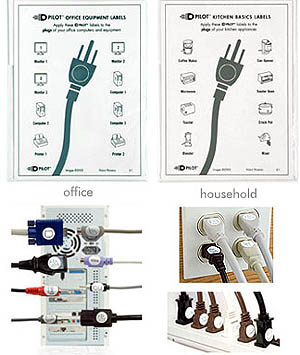
9) Concordance


Labels for your rat's nest of cords
Labels for a rat's nest of cords

The apostles may have been of one a-cord, but your church webmaster has too many of them. Mark them with these seals and keep the lines to God organized.


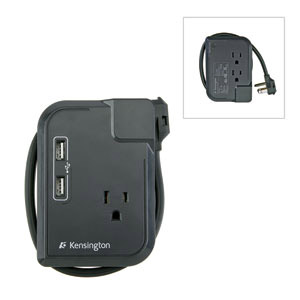
10) Let My People Glow

Kensington Portable Power Outlet and Adapter

Not enough plugs by the baptismal font to run the laptop, camcorder and lights while trying to recharge an iPhone?  This miracle devicemultiplies the outlets and USB ports so everyone can get energy according to their needs.


Need more ideas? If your webmaster is a hardcore developer, try gift ideas from Smashing Magazine. Or as you might have guessed from my header, the Atari 2600 is always a good choice. So, what gift would work for your favorite church webmaster?