Internet Evangelization Day 2007

Internet Evangelism Day — have you heard of it? I hadn’t until Church Tech Matters mentioned it. Apparently in 2007 it’s April 29.

The concept sounds interesting as it’s a day dedicated to:

  • What God is doing on the Web
  • Outreach strategies that work online
  • How your church can use the Web for outreach – and how to make effective church websites reach into the community
  • Planning an Internet evangelism-focused day for your church

Good stuff, right? What’s leaving me with more questions is that so much of the promotion of the day seems designed to get links to ied.GospelCom.net rather than the event itself. (Internet Evangelization Day .com redirects to their site with plenty of instructions on how to link properly.)

I’m celebrating Internet Evangelization Day by launching my church’s annual website users survey. How about you? And do you think the promotion has the right balance between the cause and search engine optimization?
Earth Day PDFs? Must Have Been Out of Styrofoam Cups

The Catholic Diocese of Arlington, Virginia, offered a list of thoughtful Earth Day resources, but opted for print-based PDF files. Yet at best, PDFs are okay for providing forms and such that are designed exclusively for printing. Other than for that purpose, “PDFs are evil” and “unfit for human consumption” say the usability experts.

Now I understand that the diocese was repurposing material a local parish developed the year before and was looking for an easy way (for the developers, that is) to quickly post the information. But when promoting conservation, why choose a document format that encourages unnecessary printing to read instead of regular HTML and embedded links?

Avoiding the Goodmail Blocked Images Seminar Snafu

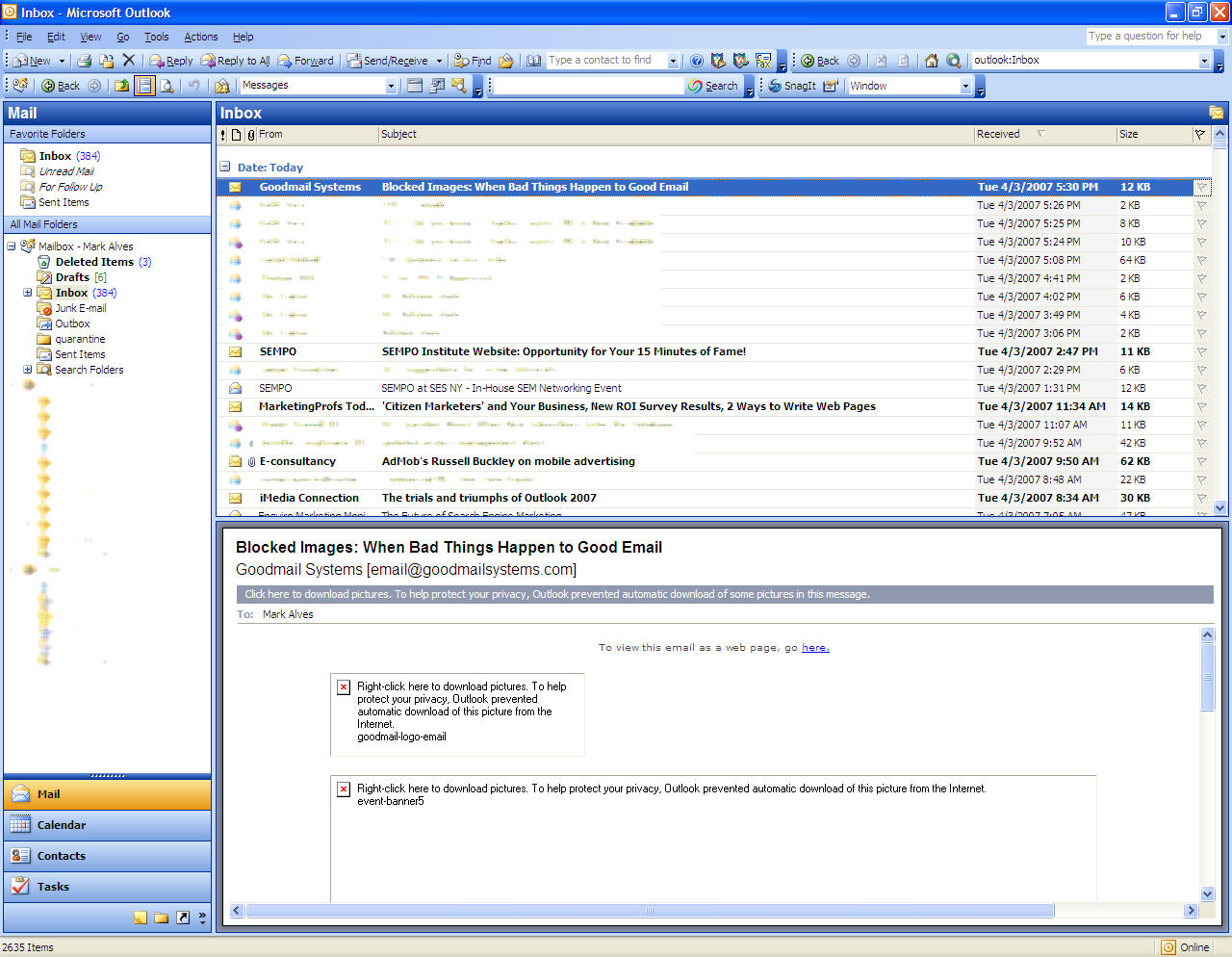
Goodmail email invitation is unreadable in preview paneImagine you’re sponsoring a seminar on avoiding the scourge of blocked images in email marketing. When it’s time to send the email invitation, what’s the one bit of formatting that you would definitely want to get right? Remember, your seminar is about blocked images in email messages. Perhaps you’d zero in on making sure your message is readable even with the images blocked? Yet the nearby inbox screenshot shows how one organization mangled such an invitation.

The message was unreadable in an Outlook preview panel. The large, blocked images meant I couldn’t see the headline, “Blocked Images: When Bad Things Happen to Good Email,” presented by Goodmail Systems, Cheetahmail and Email Experience Council. But you can avoid their mistake by following these guidelines to give your HTML email blasts a chance to be seen.

  • Test that your layout holds up in both the bottom and side preview panes of Outlook
  • Make your headlines appear as text, not as images
  • Format your messages to be understandable even without images turned off
  • Insert links in the body of the email, not solely as buttons/icons.
  • Display your full URL as text at least somewhere in the message.
  • Test your email subject lines

Vertical Response has some good examples of emails from major retailers who don’t get the blocked images issue, as does Messaging Times. MarketingSherpa has more resources on this and other email marketing issues.

Any such whoppers in your in-box? Or, gulp, your sent box? Share ’em here or send them to me.

20 Blog Usability Tips from IRBW

Do we really need another roundup post of best practices for blogs? Not anymore because Tom Johnson of I’d Rather Be Writing has put together the definitive list of 20 principles for usable and readable blogs. The post offers good advice you may have seen before, but it’s carefully edited, includes solid examples and contains links to helpful plug-ins. What’s more, you’ll find about 30 links to the original posts that inspired the column — a step that less conscientious bloggers skip. Nice flagship content, Tom.

The only blogging point not covered that often comes up is whether or not to display social media bookmarking options, such as Digg and del.icio.us buttons, and Technorati tags. Here’s a summary of the list.

  1. Pick a topic for your blog
  2. Encourage comments
  3. Make it easy to subscribe
  4. Include an About page
  5. Present your ideas visually
  6. Keep posts short and to the point
  7. Use subheadings for long posts
  8. Link abundantly
  9. Make headlines descriptive
  10. Archive by topic
  11. Include a list of related posts beneath each post
  12. Allow users to contact you offline
  13. Present your real viewpoint
  14. Write for your future employer
  15. Include a Top Posts section
  16. Provide an index
  17. Get your own URL and match it to your blog’s title
  18. Include a Recent Posts section in your sidebar
  19. Reward commenters for commenting
  20. Post often

If you like Tom’s post, Daily Blog Tips, is another site that will give you a regular fix of similar advice.

What would you add to the list?